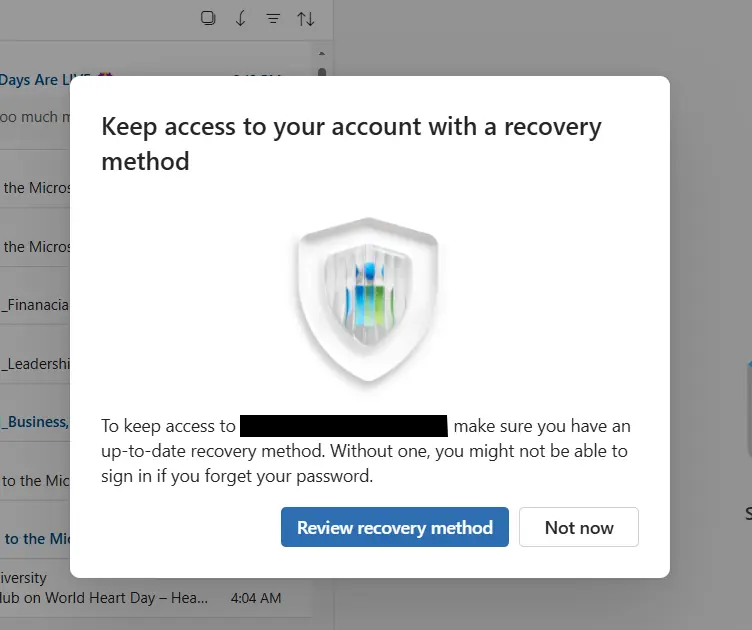
Repeated Outlook recovery method pop-up keeps appearing in Outlook
If you are repeatedly seeing the “Keep access to your account with a recovery method” popup when using Outlook.com, you are not necessarily required to add a new recovery method. The popup asks you to review your account recovery information, but some users see it repeatedly even after confirming their existing recovery methods are current and verified. The issue can be particularly annoying because you must dismiss the pop-up before you can continue using Outlook.com.
Table of Contents
Why does the Outlook recovery method popup keep appearing?
The available reports point towards an issue with how Outlook.com remembers that the recovery-method check has already been completed. In testing documented in the supplied material, the popup could be reproduced in an Incognito/Private browser session, while a normal browser session generally showed it only once for an account. This suggests that browser cookies or local storage may be involved in retaining the completion state.
Importantly, the issue does not appear to be limited to one particular account configuration. Another report describes the same popup appearing across multiple personal Outlook accounts and on different desktop browsers, while the same accounts did not show the popup when accessed from an iPhone browser.
How to fix the Outlook recovery method popup?
First, click Review recovery method and make sure your recovery information is actually correct. The supplied reports show that this opens the Microsoft account security page, where you can review your recovery methods. After confirming the information, return to Outlook.com and select Looks good if prompted. Recovery 4
If the information is already correct but the Outlook recovery method popup continues to return, try the following:
- Sign out of Outlook.com, close the browser, and sign in again.
- Check whether the popup appears in a normal browser session and an InPrivate/Incognito session.
- If the issue occurs only in the normal browser, clearing the browser’s cookies, cache, and local storage may help. This is a reported workaround, not a confirmed permanent fix. Recovery 1
- If you use a browser that regularly clears cookies or website data automatically, check its settings, as this may cause Outlook.com to lose the information indicating that the recovery check has already been completed.
Is this a Microsoft account security problem?
Not necessarily. If your recovery methods are already correct and the security page shows no pending action, repeatedly receiving the popup does not, by itself, mean your account recovery information is missing. The supplied reports specifically describe cases where the security information was already up to date, but Outlook.com continued showing the message.
At this point, the supplied material does not appear to include a confirmed permanent fix. The browser-storage explanation is based on testing and observations, rather than an official Microsoft explanation of the underlying cause. If the problem continues after checking your recovery information and browser data, using Help > Send feedback > Report a problem in Outlook.com can help Microsoft investigate the issue.
Are you also seeing the “Keep access to your account with a recovery method” popup repeatedly in Outlook.com? Let me know if clearing the browser data or using another browser fixes the problem.
Also, check the Known issues on the Your AI Report website here.