If you are tired of seeing Claude code error 1, these set of troubleshooting steps may help

Table of Contents
What is Claude Code?
Claude Code is a powerful command-line AI assistant developed by Anthropic that allows developers to code, test, and debug applications directly from their terminal. Unlike traditional AI tools that only provide suggestions, it can interact with your file system and execute commands autonomously. However, since it is a relatively new tool, some users might occasionally encounter a Claude code error during setup or execution, which can usually be fixed with standard troubleshooting. If you want to speed up your development workflow without constantly switching between your IDE and terminal, it is a must-try tool.
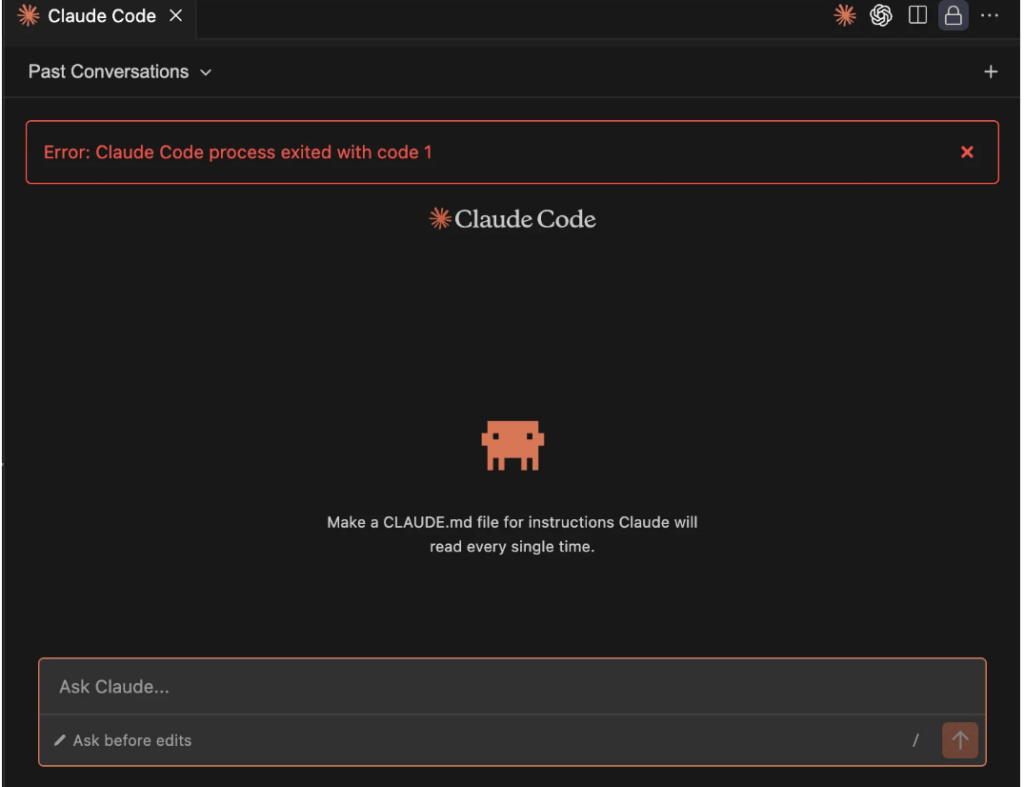
Are you encountering Claude Code Process exited with Code 1?
Many users on Reddit and Twitter post about Claude Code error, for which many troubleshooting steps are available. In the error log, something like this is seen:
From ~/Library/Logs/Claude/main.log:
2026-04-16 14:45:10 [info] [LocalAgentModeSessionManager] SDK version 2.1.111 will be used
2026-04-16 14:45:10 [info] Using Claude VM spawn function for session
2026-04-16 14:45:10 [info] [Lifecycle] Session local_38cf1389...: initializing → running
2026-04-16 14:45:11 [error] Session local_38cf1389... query error: Claude Code process exited with code 1
2026-04-16 14:45:11 [info] [Lifecycle] Session local_38cf1389...: running → idle
2026-04-16 14:45:11 [info] [CycleHealth] Unhealthy cycle: {
  session_id: 'local_38cf1389-ef67-4b00-be9e-b9ad6c431520',
  vm_instance_id: '699449a1-66d4-4725-b31a-6256cf3df68c',
  model: 'claude-opus-4-7[1m]',
  cycle_health: 'unhealthy',
  had_first_response: false,
  seconds_to_outcome: 3,
  is_resume: false,
  unhealthy_reason: 'system_error',
  error_message: 'Claude Code process exited with code 1',
  error_category: 'process_crashed'
}
I lay out some fixes below
Server side issue fixed with v1.3109.0 of Claude Desktop
If you recently ran into an abrupt crash while trying to use Cowork, you aren’t alone. A regression was introduced in the Claude Desktop version 1.3036.0 , causing Cowork sessions to instantly fail, throwing one of two common errors within about 3 seconds of launching:
Claude Code process exited with code 1Failed to create bridge sockets after 5 attempts
The Anthropic team has officially resolved this regression, which was causing the Claude Code process to exit with code 1. The fix is live in Claude Desktop v1.3109.0.
Quick Fix: Granting File Permissions in Cowork
If you are running into issues while trying to edit files, here is a quick workaround that should get everything running smoothly:
- Step 1: Open a new task inside the Cowork app.
- Step 2: Select your current project from the options.
- Step 3: Click directly inside the text input field.
- Step 4: Look for a system prompt asking for permission to edit files.
- Step 5: Select “Always allow” from the prompt.
Accept the Terms and Conditions on the Claude website
Some people report that if Anthropic decides to push a new T&C, you must accept it on the Web before you can use Claude Code. Once you do it after logging in, the Claude code error should go away.
Some additional solutions are available here, which are Technical and complex.