Here’s everything you need to know about the viral ChatGPT caricature trend and how to create your own
If you’ve been scrolling through Instagram, Facebook, or X recently, you’ve probably seen people sharing funny cartoon versions of themselves. From exaggerated facial features to comic-style portraits, the ChatGPT caricature trend has become one of the latest AI image trends. With ChatGPT’s built-in image generation capabilities, users can now upload a photo and transform it into a unique caricature in just a few seconds.
Table of Contents
- What is the ChatGPT caricature trend?
- Why is the trend going viral?
- How to create a ChatGPT caricature
- Tips for getting better AI caricatures
- Summary
What is the ChatGPT caricature trend?
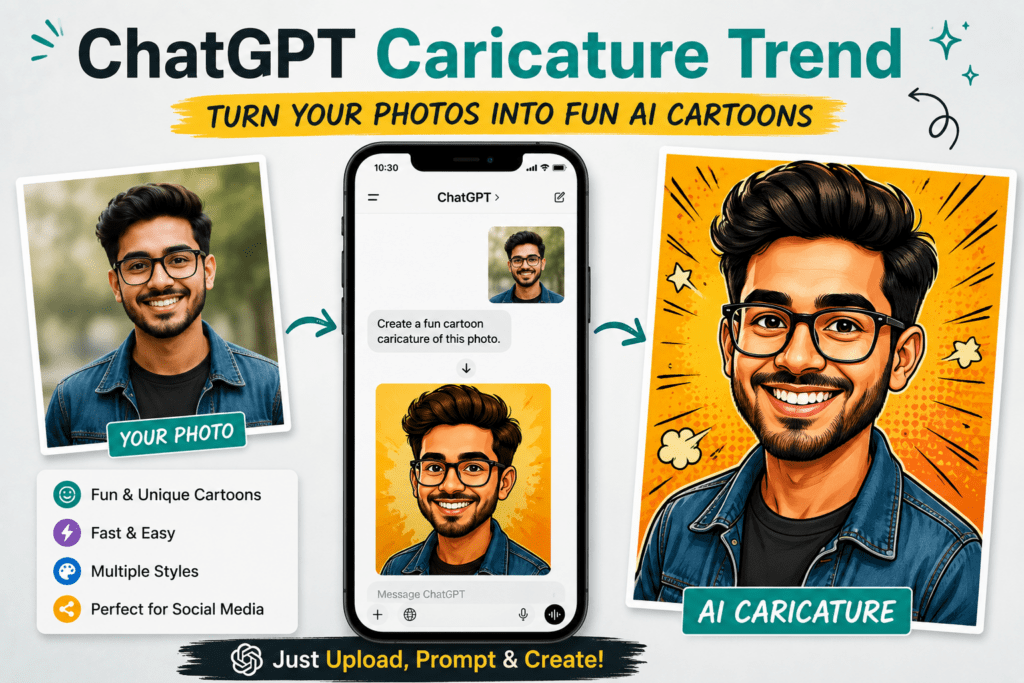
The ChatGPT caricature trend is a social media trend where users upload a selfie or portrait to ChatGPT and ask it to generate a cartoon-style caricature. Unlike a standard photo edit, a caricature exaggerates facial expressions and distinctive features while still making the person recognizable.
The trend became popular because ChatGPT’s latest image generation model can closely follow text instructions, create high-quality artwork, and even modify uploaded photos directly within the conversation. Users can generate everything from hand-drawn cartoons to comic book characters, Pixar-inspired portraits, and humorous illustrations.
Why is the trend going viral?
There are several reasons why the ChatGPT caricature trend has gained so much attention.
- It only takes a few minutes to create a personalized caricature.
- Users can upload their own photos instead of writing detailed prompts.
- The generated images are highly detailed and easy to share on social media.
- People enjoy experimenting with different art styles, facial expressions, and backgrounds.
- No professional editing skills are required.
Because each image is unique, many users create multiple versions before sharing their favorite online. This has helped the trend spread rapidly across social media platforms.
How to create a ChatGPT caricature
Creating your own AI caricature is straightforward.
- Open ChatGPT and start a new conversation.
- Upload a clear photo of yourself.
- Ask ChatGPT to create a caricature using your preferred style.
- Refine the result by requesting changes such as different expressions, outfits, colors, or backgrounds.
- Save the final image once you’re happy with the result.
For example, you can use prompts like:
- Turn this photo into a funny cartoon caricature with exaggerated facial features.
- Create a colorful comic-book style caricature from this image.
- Generate a professional caricature with a clean white background.
- Create a newspaper-style political caricature while keeping my face recognizable.
Tips for getting better AI caricatures
If your first result isn’t exactly what you expected, try these tips.
- Upload a high-resolution photo with good lighting.
- Use images where your face is clearly visible.
- Specify the art style you want, such as comic, watercolor, sketch, or digital painting.
- Mention the facial features you want exaggerated, such as hair, smile, glasses, or beard.
- Ask ChatGPT to regenerate the image if you want a different variation.
Summary
The ChatGPT caricature trend is one of the easiest ways to transform ordinary photos into creative AI artwork. Thanks to ChatGPT’s advanced image generation capabilities, anyone can create fun, personalized caricatures without using professional design software.
Have you tried the ChatGPT caricature trend yet? Let us know in the comments, and share your favorite prompts so other readers can create even better AI caricatures.